Skyscraper Town · 摩天小镇
One tower, a whole little town. Guides, privacy policy and terms.
How to Play Skyscraper Town
What kind of game is this?
You own a tower. What goes up, who moves in and which shops open are all your call. Residents need food, parking and fun; shops need customers. Get the mix right and the tower makes money. One tower, a whole little town.
From launch to playing
- Main menu: Continue, New Game, Saves and Settings. There are 4 save slots.
- New Game: name your first tower and pick a difficulty.
- Relaxed: no disasters, and homes fill up as soon as they are built.
- Standard: fires, blackouts and burst pipes happen, so fire safety and repairs need funding.
- Hardcore: on top of that, new homes wait for tenants and every empty tile costs you daily.
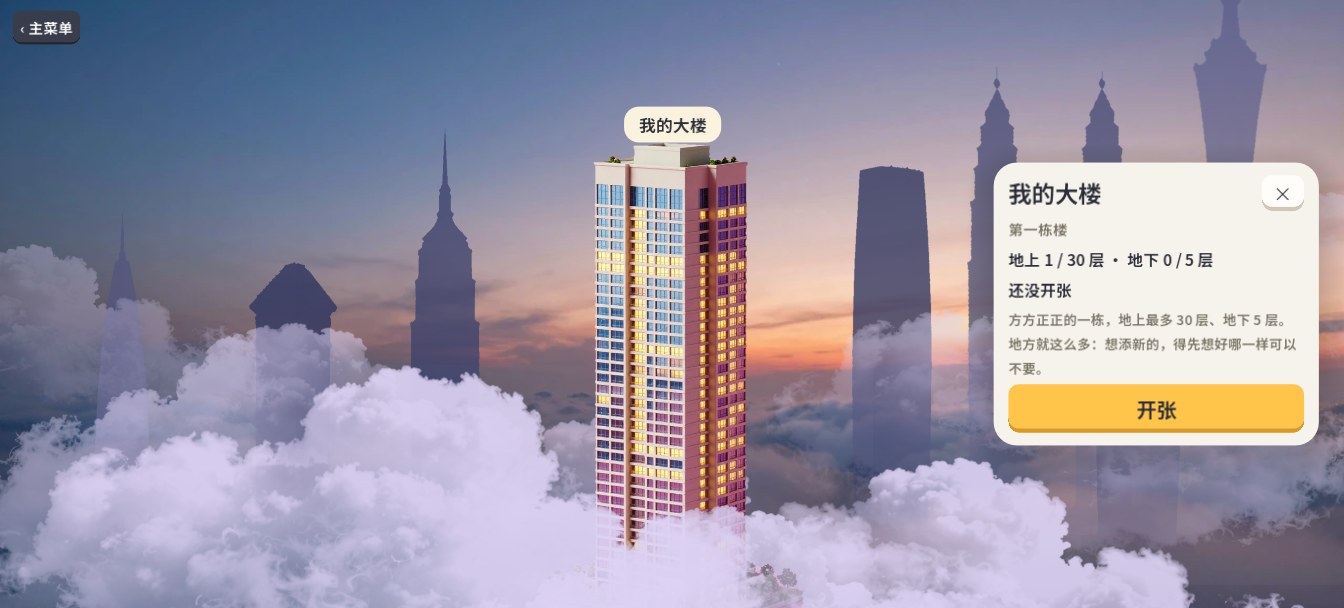
- The city above the clouds: a row of towers above a sea of clouds. The one with its lights on is yours. Tap it for a summary, then tap Enter. The rest are still hidden in the clouds until you run your tower well.
- Inside the tower: the first time, a short tour shows you the interface, has you build your first apartment floor, and ends with tapping ▶ to start the clock.
The interface
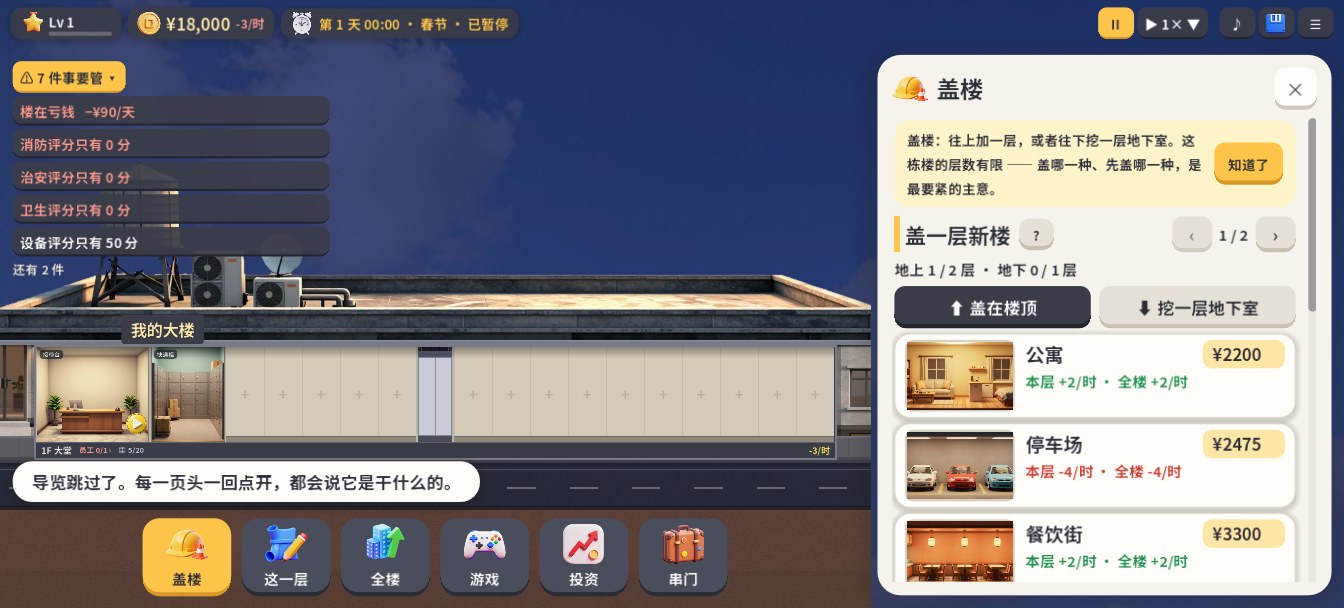
| Where | What |
|---|---|
| Top left | Owner level, cash and net income per hour, date and weather |
| Top left, under the bar | “Things to Fix”: what is going wrong right now and how much it costs per day. Tap a line to go there. It can be folded away |
| Top right | Pause, play and speed, mute, save, menu |
| Bottom | Build, This Floor, Tower, Games, Invest, Visit |
| Center | Your tower. Tap a floor to select it. Pinch to zoom (mouse wheel on PC) |
Each page explains itself the first time you open it.
Basic controls
- Build: tap Build at the bottom, pick a floor type and tap Build. You can go up, or dig basements.
- Add rooms: tap a floor, then pick rooms under Add in This Floor. Each floor has 20 tiles.
- Hire: a red tag on a floor means it is short of staff. Tap it to hire.
- Move rooms: press and hold a room until the ring fills, then tap a green spot to place it, or tap another room to swap.
- Upgrade: upgrade floors and rooms in This Floor.
- Speed up: tap the speed next to ▶. Faster speeds unlock at higher owner levels.
Running a good tower
- Watch the mix: residents need food, parking and services, and at higher levels leisure, wellness and education. Whatever is short, every floor that needs it earns less.
- Watch the layout: the same room earns differently depending on where it sits and what is next to it. Keep noisy shops away from apartments. Some floors boost each other when adjacent. Tower → Structure shows how much your layout is adding and costing.
- Space is limited: the first tower holds at most 30 floors above ground and 5 basements. Adding something new means deciding what to give up.
- Height costs money: past 10 floors, every extra floor adds structure upkeep. Empty floors are money down the drain.
- Advisors: at a high enough owner level you can hire advisors who give tips and handle chores, and later let them run the tower automatically.
Minigames
Every shop you open brings a minigame: more than seventy card, board, arcade, sports and craft games. Each has a Rules button at the top with the full rules.
Minigames are entertainment only. Sky Coins are fictional in-game items that cannot be bought with real money or exchanged for real money or goods, and card games involve no stakes.
Saves
- The game saves automatically, and also when it goes to the background or closes.
- Saves live on your device. In the Google Play version, once you sign in to Google Play Games, a copy is backed up to your own Google account automatically, so you can restore it on a new phone.
- If you haven’t signed in, copy a save code under Settings → Saves before changing phones or reinstalling, and paste it in the main menu on the new device.
FAQ
Do I need to be online? No. When online, the game downloads the latest balance values (see the Privacy Policy). Otherwise it only goes online when you sign in to Google Play Games, make a purchase or send feedback.
Do I need an account? No. In the Google Play version, purchases go through Google Play, and cloud saves use Google Play Games. There is nothing else to sign up for.
Is it free? It’s free to download, and the whole first tower is free with no time limit. If you enjoy it, one-time unlocks add every later tower, unlimited minigames, faster game speeds, Advisor Auto-Run, or all four together. Buy once and keep it on every device. Optional Time Card packs skip real-time upgrade waits, and daily and weekly quests give them out too.
Are there ads? Only if you want a bonus. In the Google Play version you can tap “Watch an ad” for things like an extra daily reward or 15 minutes off a wait. Nothing plays unless you tap, and if you’ve bought anything you get these rewards without an ad.
How do I report a problem? In the game: Menu → Settings → Account → Report a Problem. You can also email wanwulab@gmail.com or open an issue at https://github.com/datianda/skyscraper-town/issues.